To build effective guest management, start with your booking system’s guest profiles and make it a daily habit to capture preferences during service. The restaurants that do this consistently see 25 to 40% higher repeat visit rates because guests return to places where they feel known.
Most restaurants collect guest names and phone numbers for reservations and never do anything with that data. Meanwhile, every reservation is a chance to learn what a guest likes, remember it, and use it next time. The difference between a good restaurant and one guests are loyal to is often just this: you remembered.
Key takeaways
- Main solution: Capture guest data at booking, enrich it during service, use it to personalize and market
- Expected result: 25-40% increase in repeat visits, higher average spend from regulars
- Time to implement: 1-2 hours for setup, ongoing 5 minutes per service for data entry
- Cost: Free (most booking systems include guest profiles)
Before you start
Take stock of what guest data you already have.
What you’ll need:
- Your reservation system (most have built-in guest profiles)
- Access to any existing guest lists, email lists, or loyalty records
- Buy-in from your host and server team
Assess your current state:
- Do you know how many unique guests visited last month?
- Can you identify your top 20 guests by visit frequency?
- Do you record dietary restrictions or preferences anywhere?
- When a regular walks in, does your host know their name?
If you answered “no” to most of these, you have significant upside. Even basic guest tracking will improve your service noticeably.
Step 1: Set up guest profiles in your booking system
Most modern reservation systems automatically create a guest profile when someone books. Your job is to make sure these profiles capture the right information.
What to do:
- Enable guest profiles in your booking system
- Set up required fields: name, phone, email
- Add custom fields for your operation: seating preference, dietary needs, VIP status
- Import any existing guest data from spreadsheets or old systems
- Merge duplicate profiles (same guest, different phone numbers)
Recommended profile fields:
| Field | Source | Why it matters |
|---|---|---|
| Name, phone, email | Booking form | Contact and identification |
| Visit count | Automatic | Identifies regulars |
| Last visit date | Automatic | Flags lapsed guests |
| Seating preference | Host observation | Personal touch |
| Dietary restrictions | Server notes | Safety and service |
| Celebration dates | Guest mention | Marketing opportunities |
| Spend history | POS integration | Identifies high-value guests |
| Internal notes | Staff input | Context for next visit |
Step 2: Train your team to capture data
A guest database is only as good as the data going into it. Your front-of-house team needs to make data capture part of their routine.
What to do:
- Brief hosts: check guest profiles before greeting, note any preferences
- Brief servers: record dietary restrictions and notable preferences after service
- Create a 2-minute end-of-shift habit for entering guest notes
- Recognize staff who consistently contribute good data
What to capture and when:
| Moment | What to note | Who captures it |
|---|---|---|
| Booking | Name, party size, occasion mentions | Automatic from booking |
| Arrival | Greeting response, preferred name, mobility needs | Host |
| Ordering | Allergies, strong preferences, wine choices | Server |
| During meal | Feedback, conversation highlights, celebration details | Server |
| Departure | Overall satisfaction, intention to return | Host or manager |
Keep it simple for staff: The notes don’t need to be formal. “Loves the corner booth, allergic to shellfish, celebrating anniversary in March” is more useful than a structured form.
Step 3: Identify and tag your VIP guests
Not all guests are equal in business terms. Identify your most valuable guests and make sure they get recognized every time.
What to do:
- Define VIP criteria for your restaurant
- Tag guests who meet the criteria
- Set up alerts so hosts see VIP status when they book or arrive
- Create a short VIP protocol for your team
VIP criteria examples:
| Tier | Criteria | Recognition |
|---|---|---|
| Regular | 4+ visits in 3 months | Greet by name, remember preferences |
| VIP | 8+ visits or $2,000+ annual spend | Preferred seating, complimentary amuse-bouche |
| Top VIP | 15+ visits or $5,000+ annual spend | Manager greet, off-menu access, priority reservations |
Adjust these thresholds for your operation. A neighborhood bistro’s VIP visits weekly. A fine dining restaurant’s VIP might come monthly but spend significantly per visit.
VIP alerts: Configure your booking system to show a flag when a VIP books or arrives. The host should see this before the guest reaches the stand. Nothing feels better to a guest than being recognized without having to ask.
Step 4: Use guest data to personalize service
Data is useless unless it changes how you operate. Here’s how to put guest profiles to work.
What to do:
- Include VIP alerts and returning guest notes in pre-shift briefings
- Have hosts check profiles before each reservation arrives
- Brief servers on guest preferences for their tables
- Note special occasions and surprise guests when appropriate
Pre-shift checklist: Before each service, review tonight’s reservations and flag:
- Returning guests (share their preferences with the server)
- VIPs (confirm preferred table, alert manager)
- Special occasions (birthday, anniversary, business dinner)
- Guests with dietary restrictions or allergies
- First-time guests from high-value referral sources
Personalization that guests notice:
| Action | Cost | Guest impact |
|---|---|---|
| Greet by name | Free | High: “They know me here” |
| Remember seating preference | Free | Medium: removes friction |
| Acknowledge dietary needs proactively | Free | Very high: builds trust |
| Birthday dessert or card | $2-5 | Very high: creates memorable moment |
| Note from chef on return visit | Free | High: makes guest feel valued |
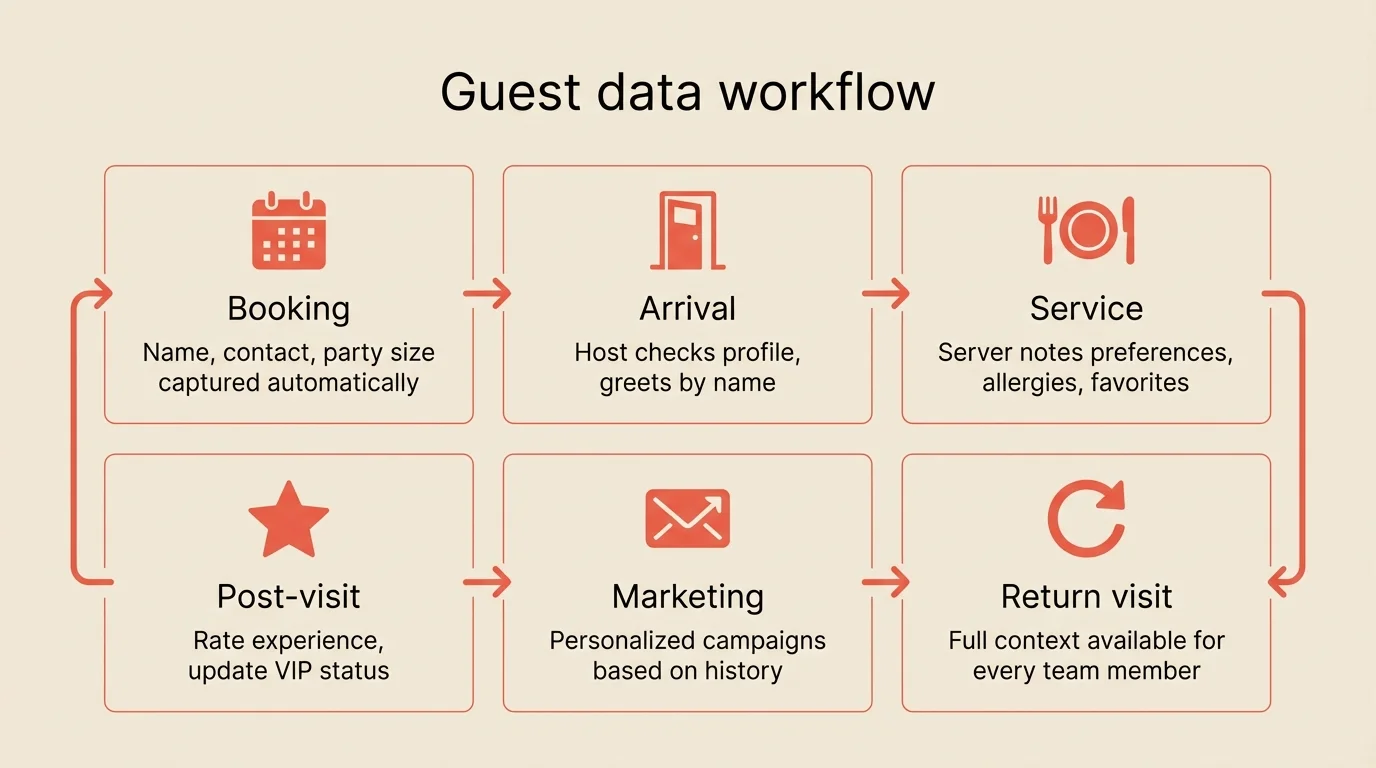
Step 5: Drive repeat visits with targeted outreach
Your guest database is a marketing goldmine. Use it to bring guests back.
What to do:
- Segment your database by visit frequency and recency
- Send personalized campaigns to each segment
- Re-engage lapsed guests before they forget you
- Reward loyalty without discounting
Segmentation that works:
| Segment | Definition | Campaign |
|---|---|---|
| New guests | First visit in last 30 days | ”Thanks for visiting” with booking link |
| Active regulars | 2+ visits in last 60 days | ”Your table is waiting” for slow nights |
| Lapsed regulars | No visit in 60-90 days | Personal note from owner/chef |
| Lost guests | No visit in 90+ days | ”We miss you” with special invitation |
| Celebration guests | Birthday/anniversary upcoming | ”Celebrate with us” with offer |
Email marketing basics:
- Keep emails short with one clear call to action
- Always include a direct booking link
- Send from a person (the chef, the owner), not “info@restaurant.com”
- Frequency: 2-4 emails per month maximum
For more on driving repeat bookings, see how to get more reservations.
Step 6: Maintain data quality
Guest data degrades over time. Phone numbers change, emails bounce, preferences evolve. Build maintenance into your routine.
What to do:
- Merge duplicate profiles monthly
- Update contact info when guests mention changes
- Review and clean bounced emails quarterly
- Archive profiles with no activity in 2+ years
- Audit VIP tags quarterly to keep them meaningful
Data hygiene schedule:
| Task | Frequency | Time |
|---|---|---|
| Merge duplicates | Monthly | 15 min |
| Clean bounced emails | Quarterly | 30 min |
| Review VIP tags | Quarterly | 20 min |
| Archive inactive profiles | Annually | 1 hour |
Common mistakes to avoid
Collecting data but never using it
The most common failure. If guest notes don’t make it into pre-shift briefings, staff won’t bother entering them. Create a feedback loop where data directly improves service.
Over-relying on technology
A database supports guest relationships, it doesn’t replace them. The most important guest management tool is a host who pays attention and a server who listens. Technology just helps them remember.
Making guests feel surveilled
There’s a line between “they remembered my birthday” and “they know too much about me.” Use data to improve service naturally. Don’t reference information the guest didn’t share directly with your team.
Ignoring privacy regulations
Collect consent for marketing emails. Include an unsubscribe link. Don’t share guest data with third parties. Most booking systems handle compliance, but verify your setup.
Treating all guests the same
A couple on their 50th visit deserves different treatment than first-timers. VIP recognition programs aren’t about exclusivity, they’re about acknowledging loyalty.
How to measure success
Track these metrics monthly:
| Metric | Before | Target | How to track |
|---|---|---|---|
| Repeat visit rate | 15-20% | 30%+ | Returning guests / total guests |
| Profile completion | 0% | 60%+ of regulars | Profiles with 3+ data points |
| VIP retention | Unknown | 80%+ quarterly return rate | VIP visits / VIPs tagged |
| Email campaign bookings | 0 | 5-10% conversion | Bookings from email links |
| Staff data entry | 0% | 80%+ tables noted | Profiles updated / reservations served |
Tools that help
Most modern booking systems include guest management features. Look for:
Guest profiles that auto-create from bookings and capture visit history, preferences, and notes.
VIP tagging and alerts that flag important guests when they book or check in.
Guest notes visible to hosts and servers so every team member has context.
Email integration or export that lets you run campaigns based on guest segments.
Analytics showing visit frequency, spend patterns, and guest trends.
Resos includes guest profiles, notes, VIP flagging, and guest analytics on all plans, with no per-cover fees.
Frequently Asked Questions
What is restaurant guest management?
Do I need a CRM for my restaurant?
What guest data should restaurants collect?
How do I get staff to actually use a guest database?
Is it legal to collect guest data for marketing?
The bottom line
Guest management doesn’t require expensive software or complicated systems. It starts with paying attention and writing things down. Use your booking system’s guest profiles, train your team to capture one observation per table, and make that data visible in pre-shift briefings.
The payoff is guests who feel recognized, return more often, spend more, and recommend you to others. Start with your top 20 regulars. Learn their preferences, acknowledge their loyalty, and build from there.
Related guides: How to get more reservations | How to reduce no-shows | How to plan your restaurant’s seating capacity | Prepayments and deposits