To implement deposits effectively, you need to set the right amount, apply them to the right bookings, and communicate clearly with guests. A deposit is exposure management: it decides what you recover when a booking you cannot refill does not arrive.
It is worth being straight about the evidence. No-show rates are low on a per-reservation basis to begin with. The recorded rate across 3.77 million advance reservations at 2,417 restaurants in the Resos No-Show Index 2026 was 2.33%. Comparing protected bookings with unprotected ones does not isolate the effect of the payment requirement, because the two groups differ by service, venue, and guest. So this guide does not promise a reduction figure. It shows you how to apply deposits where a missed booking actually hurts, and how to measure what happens in your own data.

Key takeaways
- Main solution: Strategic deposits for high-exposure bookings + clear refund policy + apply to final bill
- What to expect: Recovered value on the bookings you protect, and a measurable arrival rate to compare against your baseline. Not a guaranteed drop in your overall rate
- Time to implement: 1-2 hours for setup, ongoing management minimal
- Cost: Payment processing fees only (typically 2.9% + $0.30 per transaction)
Before you start
Deposits work best when you understand your current situation and have clear goals.
What you’ll need:
- Reservation system with payment collection capability
- Payment processor (Stripe, Square, or built-in)
- Clear cancellation policy language
- Staff trained on communicating the policy
Know your numbers: Work out what your own no-shows expose you to, using your measured rate rather than a borrowed one:
For a 50-seat restaurant expecting 3,000 covers a month at a $75 average check, a measured 2.33% no-show rate puts about 70 covers and roughly $5,200 of covers at risk each month. Run it again at your own rate: the figure moves a long way between a 1% and a 5% venue, and part of it is recoverable through a waitlist or walk-ins. Use the no-show cost calculator to model your own numbers rather than inheriting an example.
Deposits are worth the friction when that exposure sits in bookings you cannot refill at short notice. They are rarely worth it on a Tuesday lunch with open tables.
Step 1: Choose your payment structure
Different situations call for different approaches. Match the structure to your operation.
What to do:
- Review your booking types and risk levels
- Select the appropriate structure for each
- Document your approach for consistency
- Train staff on the differences
Payment structures:
| Type | How it works | Best for |
|---|---|---|
| Full prepayment | Guest pays entire meal cost upfront | Tasting menus, special events, omakase |
| Partial deposit | $20-50 per person, applied to bill | Fine dining, high-demand times |
| Credit card hold | Card charged only if guest no-shows | Casual upscale, everyday reservations |
| Cancellation fee | Flat fee charged for late cancels/no-shows | Broad applicability, lower friction |
Pro tip: Start with credit card holds if you’re nervous about guest reaction. They provide protection without upfront charges. Graduate to deposits once you see the impact. See our best fine dining reservation systems guide for platforms with built-in prepayment features.
Step 2: Set the right deposit amount
The deposit needs to be meaningful but not prohibitive. Too low and it won’t change behavior. Too high and you’ll scare off legitimate guests.
What to do:
- Consider your average check when setting amounts
- Match amounts to restaurant type and guest expectations
- Test amounts and adjust based on booking impact
- Keep amounts consistent for similar booking types
Deposit guidelines by restaurant type:
| Restaurant type | Suggested deposit | Notes |
|---|---|---|
| Casual dining | $5-15 per person | Enough to deter casual no-shows |
| Upscale casual | $15-25 per person | Standard for busy weekend slots |
| Fine dining | $25-50 per person | Higher commitment matches higher prices |
| Tasting menus | Full prepayment | Price transparency, no surprises |
| Special events | 50-100% prepayment | Protects against significant loss |
A $25 deposit on a $40 meal feels heavy. The same $25 on a $150 dinner feels proportional. Consider the ratio, not just the amount.
Step 3: Decide when to require deposits
Not every reservation needs a deposit. Strategic application maximizes commitment without creating unnecessary friction.
What to do:
- Identify your highest-risk booking scenarios
- Implement deposits for those scenarios first
- Track results before expanding
- Create exceptions for loyal guests if appropriate
Always require deposits for:
- Weekend dinner service (Friday-Sunday)
- Large party bookings (6+ guests)
- Peak hours and special occasions
- Holidays (Valentine’s Day, Mother’s Day, New Year’s Eve)
- Guests with previous no-show history
- Limited-seating experiences or tasting menus
Consider skipping deposits for:
- Weekday lunch
- Regular guests with strong track records
- Off-peak times when you have excess capacity
- Markets where deposits aren’t culturally expected
Step 4: Create a clear cancellation policy
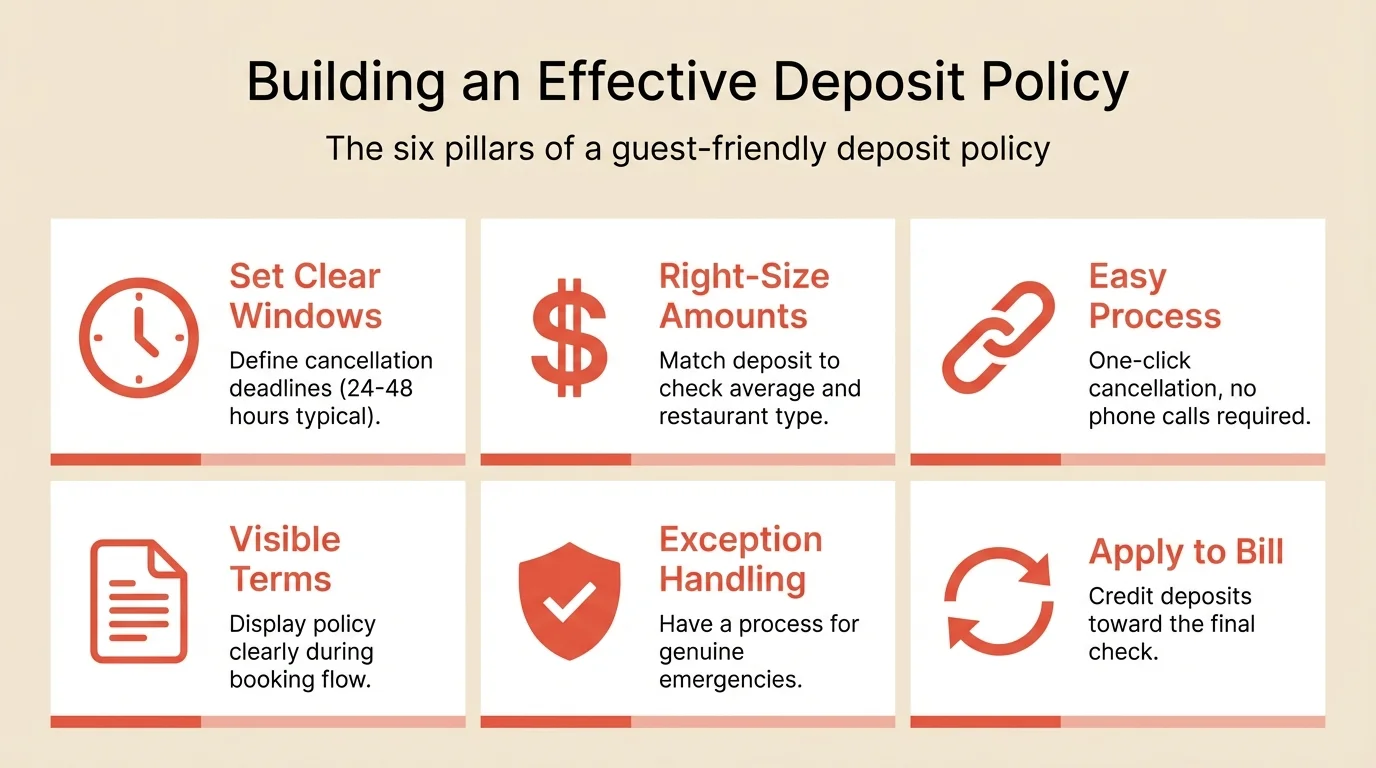
Your cancellation policy determines whether deposits feel fair or punitive. The best policies balance protection with flexibility.
What to do:
- Define your cancellation window (24-48 hours standard)
- Write the policy in plain language
- Make the process easy (one-click cancellation)
- Document exception handling for emergencies
Policy elements to include:
- Clear cancellation window (24-48 hours before reservation)
- Easy cancellation process (one click, not a phone call)
- What happens to the deposit (refunded, applied, forfeited)
- How to handle emergencies (unwritten flexibility is fine)
Sample policy language: “Cancellations made more than 24 hours before the reservation receive a full refund. Late cancellations and no-shows forfeit the deposit. Your deposit will be applied to your bill when you dine with us.”
Step 5: Set up your payment system
The technical implementation needs to be seamless for guests and staff.
What to do:
- Enable payment collection in your reservation system
- Connect your payment processor
- Configure deposit amounts by booking type
- Test the guest experience yourself
Before launch checklist:
- Payment processor connected and tested
- Deposit amounts configured correctly
- Policy language displays during booking
- Confirmation emails include policy summary
- Staff know how to process deposits and handle questions
Technical requirements:
- PCI-compliant payment processing
- Automatic deposit application to final bill
- Refund capability for cancellations within window
- Reporting on deposits collected and forfeited
Step 6: Communicate the policy effectively
How you communicate deposits matters as much as the policy itself. Done well, guests understand and accept. Done poorly, you’ll face pushback.
What to do:
- Show deposit amount and policy before card entry
- Explain that deposits apply to the final bill
- Train staff to explain confidently and positively
- Prepare responses for common objections
During the booking process:
- Display deposit amount clearly before checkout
- Show cancellation window and refund policy
- Confirm that deposit applies to final bill
- Send immediate confirmation with policy summary
If guests push back: “We introduced deposits to ensure we can hold your table and not turn away other guests. The deposit applies directly to your bill, so it doesn’t cost you anything extra. It just confirms your commitment.”
Pro tip: Most guests who object weren’t planning to show up anyway. The ones who book despite deposits are your best customers.
Step 7: Monitor and adjust
Track results and refine your approach based on data.
What to do:
- Track deposit conversion rates (bookings started vs. completed)
- Monitor no-show rates by deposit vs. non-deposit bookings
- Review forfeiture rates monthly
- Adjust amounts or timing based on results
Metrics to track:
| Metric | What it tells you | What to compare against |
|---|---|---|
| Booking conversion | Whether the deposit step is costing you bookings | Your own completion rate before the change |
| No-show rate (deposit bookings) | Arrival behavior on protected bookings | The same service before you introduced deposits |
| Deposit forfeiture rate | How often you actually recover something | Your own trend month to month |
| Average check (deposit vs. non) | Whether protected bookings spend differently | The same service, same weekday |
Read the forfeiture rate as information, not a verdict. A rising rate means you are recovering value on bookings that would otherwise have cost you the table. A near-zero rate means almost nothing is being charged, which could mean guests are arriving or simply that you rarely enforce it. Both readings need your own booking data to settle, and the comparison only holds if you look at the same service before and after the change.
Common mistakes to avoid
Setting deposits too low
A $10 deposit on a $200 dinner won’t change behavior. Match the amount to the stakes.
Applying deposits everywhere
Deposits for Tuesday lunch at a half-full restaurant creates friction without benefit. Target high-risk scenarios.
Making the policy hard to find
Surprise deposits create angry guests. Show the policy clearly before payment.
Inconsistent enforcement
Waiving deposits for some guests teaches everyone to ask for exceptions. Be consistent.
Forgetting to apply to the bill
Guests expect their deposit to count toward their meal. Make sure your system handles this automatically.
How to measure success
Track these metrics before and after implementing deposits:
| Metric | Baseline | What you are looking for | How to track |
|---|---|---|---|
| No-show rate (protected bookings) | Your rate on that service before the change | A difference large enough to survive a normal month-to-month swing | System reporting |
| Overall no-show rate | Your measured rate | Movement on the services you changed, not the whole book | System reporting |
| Average check (deposit guests) | Your current average | Any consistent gap against the same service unprotected | Compare segments |
| Booking conversion | Your completion rate today | No material drop once the policy is explained clearly | Checkout completion |
Give it at least a full month per service, and compare like with like. No-show rates swing by weekday, season, and party size on their own: the index records January at 2.62% against August at 2.14%, and Monday at 2.69% against Wednesday at 2.09%. A change smaller than that swing is not yet a result.
Work out what it returns:
Tools that help
Modern reservation systems handle deposit collection seamlessly.
Payment processing integrated directly into booking flow collects deposits without friction. Look for systems with built-in Stripe or Square integration.
Automatic application credits deposits to final bills without manual intervention. The guest sees their deposit already applied when the check arrives.
Flexible policies let you set different deposit amounts for different scenarios. Large parties get one amount, peak times another.
Reporting shows you deposit conversion, forfeiture rates, and no-show comparisons so you can optimize over time.
If your current system doesn’t support deposits, Resos’s reservation system includes built-in payment collection with no per-cover fees.
Frequently Asked Questions
How much should I charge for a restaurant reservation deposit?
Do prepayments actually reduce no-shows?
Should deposits be refundable or non-refundable?
Will requiring deposits hurt my bookings?
What's the difference between a deposit and a prepayment?
The bottom line
Deposits are a way to put a value on the bookings you cannot afford to lose. Start where the exposure is real: Saturday dinner, large parties, tasting menus, holidays. Set amounts proportional to your check average, make the policy visible before the card is entered, and keep cancellation genuinely easy so guests release tables instead of vanishing.
What deposits do not come with is a guaranteed number. Nobody can tell you they will cut your rate by half, and any source that does is not measuring carefully. Apply them where a missed booking hurts, then judge them on your own before-and-after data over a full month.
Related guides: How to reduce no-shows | How to reduce cancellations | Large party bookings