To reduce cancellations, you need a system that catches problems early and makes cancelling easier than ghosting. Restaurants that implement confirmation requests, clear policies, and strategic deposits typically cut their late cancellation rate by 30-50% within the first month.
That text at 4pm stings every time: “Sorry, something came up. Need to cancel tonight.” Three hours before service. A four-top on Saturday night. Gone. For a restaurant averaging $80 per guest, that’s $320 in revenue that just evaporated, and no time to fill the table.
Last-minute cancellations cost the average restaurant $1,500-$3,000 monthly based on industry benchmarks. But cancellations aren’t random. They’re predictable and largely preventable with the right systems.
Key takeaways
- Main solution: Automated confirmation requests + clear cancellation policy + strategic deposits
- Expected result: 30-50% reduction in cancellation rate, 50%+ rebooking success
- Time to implement: 30-60 minutes initial setup, weekly monitoring
- Cost: Free with most reservation systems; deposit processing may have fees
Before you start
Reducing cancellations requires a mindset shift: you’re not inconveniencing guests by implementing policies. You’re protecting your business and creating a better experience for everyone.
What you’ll need:
- Access to your reservation system’s settings and reports
- Authority to set or change cancellation policies
- Buy-in from front-of-house staff to communicate policies
- 30-60 minutes for initial setup, ongoing monitoring weekly
Know your numbers first:
Pull your last 90 days of data and calculate:
Break it down by:
- Day of week (Saturdays often run higher)
- Time to cancellation (how many hours/days before?)
- Party size (large parties cancel more)
- Booking source (different channels may have different rates)
You can’t improve what you don’t measure.
Step 1: Set up automated confirmation requests
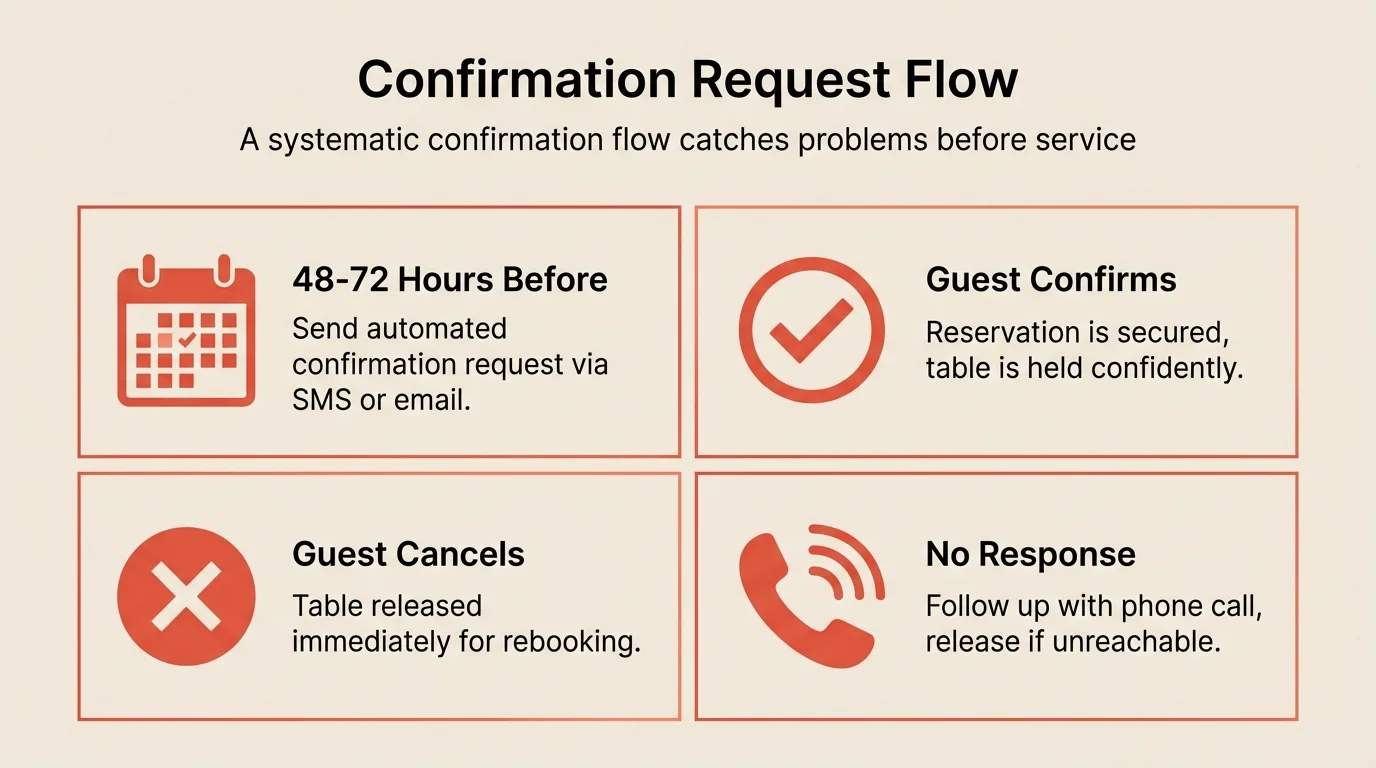
Confirmation requests are your first line of defense. They catch guests who forgot they booked, those whose plans changed, and those who double-booked at multiple restaurants.
What to do:
- Enable confirmation requests in your reservation system
- Set timing: 48 hours before for weeknight, 72 hours for weekend prime time
- Include date, time, party size, and clear confirm/cancel buttons
- Build a follow-up system for guests who don’t respond
Pro tip: Ask for confirmation, don’t just remind. “Please confirm your reservation” gets higher response rates than “Reminder: you have a reservation.” The active request creates commitment.
What good looks like:
- 70%+ of guests confirming within 24 hours of request
- Cancellations identified 24+ hours before reservation
- Time for staff to attempt rebooking released tables
Step 2: Send smart reminders at the right time
Reminders serve a different purpose than confirmations. They’re for guests who’ve confirmed but might still forget.
What to do:
- Send a final reminder 2-4 hours before the reservation
- Keep it brief: just the essentials (time, party size, address)
- Include easy modify/cancel link, even at this stage
- Use SMS for higher open rates (98% vs 20% for email)
Timing by reservation time:
| Reservation time | Reminder timing | Why |
|---|---|---|
| Lunch (11am-2pm) | Morning of, 8-9am | Catches morning planners |
| Early dinner (5-6pm) | Same day, 1-2pm | After lunch, before commute |
| Prime dinner (7-9pm) | Same day, 3-4pm | Time to rebook if cancelled |
What to avoid:
- Reminders so early they’re forgotten again
- Reminders so late there’s no time to rebook
- Reminder fatigue from too many messages
Step 3: Establish clear cancellation windows
A cancellation policy only works if guests know about it and face consequences for violating it.
What to do:
- Define your cancellation window (24 hours is standard)
- Write the policy in plain language (no legal jargon)
- Display it prominently during booking
- Include it in confirmation emails
- Enforce it consistently
Sample policy language: “Cancellations made more than 24 hours before your reservation are always free. Cancellations within 24 hours or no-shows may be charged $25 per guest. We understand plans change. Just let us know as soon as possible so we can seat other guests.”
Adjust windows by situation:
| Booking type | Suggested window | Rationale |
|---|---|---|
| Standard reservation | 24 hours | Time to rebook |
| Large party (6+) | 48-72 hours | Harder to fill |
| Special event/holiday | 72 hours | High demand, full commitment |
| Tasting menu/prix fixe | 48 hours | Food already planned |
Step 4: Implement strategic deposit requirements
For high-risk reservations, deposits change behavior more effectively than policies alone.
What to do:
- Identify high-risk booking types (large parties, peak times, special events)
- Set deposit amounts proportional to the commitment ($25-50 per person typical)
- Make deposits refundable within your cancellation window
- Apply deposits to the final bill for guests who arrive
When to require deposits:
- Large parties (6+ guests)
- Friday and Saturday prime time
- Holidays (Valentine’s Day, Mother’s Day, New Year’s Eve)
- Guests with previous cancellation history
- Tasting menus or special chef’s experiences
When to skip deposits:
- Weekday lunch
- Regular guests with strong track records
- Off-peak times when rebooking is easy
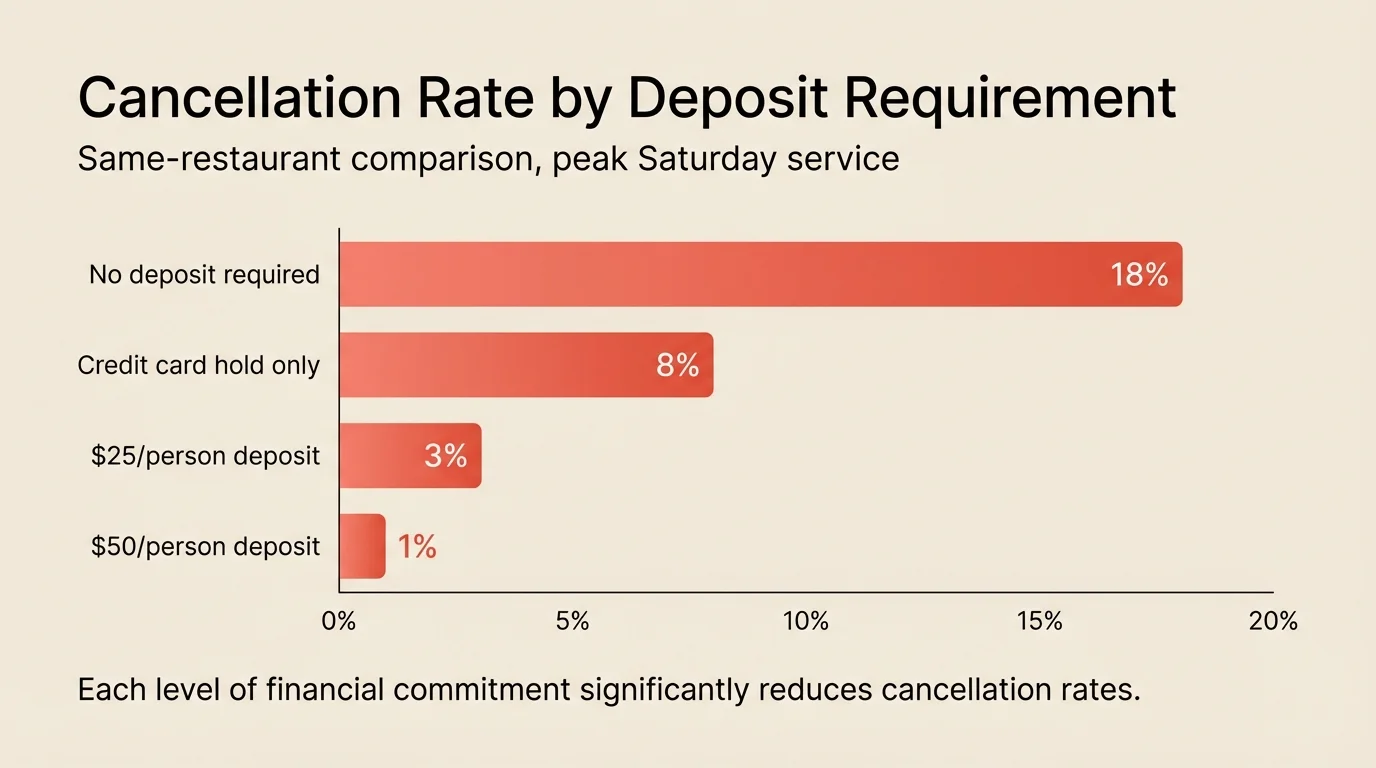
For more on implementing deposits effectively, see our guide on prepayments and deposits.
Step 5: Create frictionless cancellation options
Counterintuitive but true: making it easy to cancel reduces no-shows and late cancellations. When canceling is hard, guests just don’t show up.
What to do:
- Include one-click cancel links in all communications
- Don’t require phone calls during service hours
- Send a brief “We’re sorry to miss you” confirmation
- Immediately trigger rebooking attempts for released tables
What the cancel flow should look like:
- Guest clicks cancel link in email/SMS
- Cancellation confirmed instantly (no login required)
- You get notified and table is released
- Optional: offer to rebook for another date
What to avoid:
- Requiring phone calls (guests won’t call during your busy service)
- Guilt-tripping language that makes guests avoid the conversation entirely
- Complicated processes that guests abandon
Step 6: Build a rebooking system for cancelled tables
A cancelled table is only lost revenue if it stays empty. Fast rebooking turns cancellations into opportunities.
What to do:
- Set up instant alerts when cancellations come in
- Maintain a waitlist for high-demand times
- Contact waitlist guests immediately when tables open
- Post last-minute availability on social media
- Train hosts to proactively offer cancelled tables to walk-ins
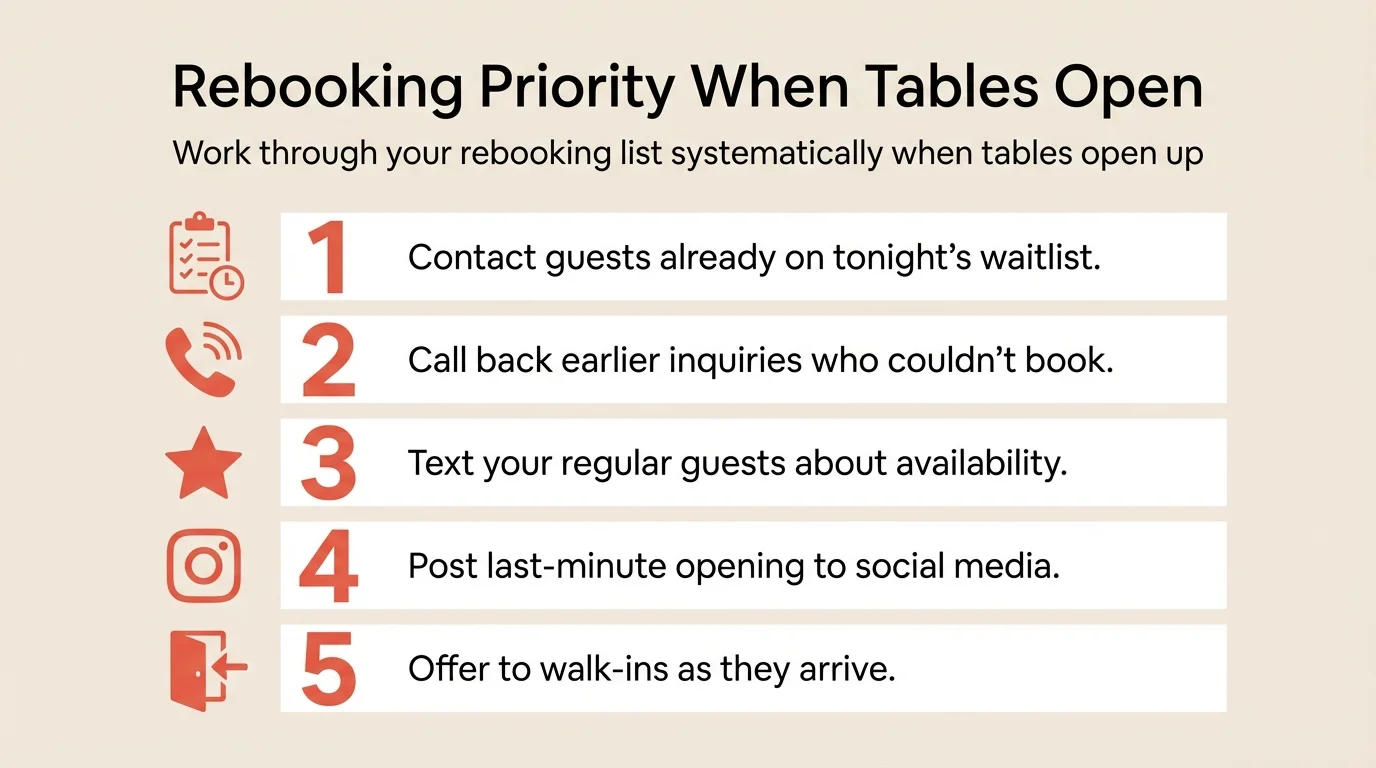
Rebooking priority list:
- Waitlist guests for that time slot
- Guests who called earlier and couldn’t get a table
- Your regulars (quick text or call)
- Social media followers (Instagram stories work well)
- Walk-ins as they arrive
For managing your waitlist effectively, see our guide on waitlist management.
Step 7: Track cancellation patterns and repeat offenders
Not all cancellations are equal. Some guests cancel responsibly within policy. Others are chronic last-minute cancellers who cost you money repeatedly.
What to do:
- Tag all cancellations in your reservation system
- Note timing (how many hours before?)
- Track by guest to identify repeat patterns
- Flag chronic cancellers for special handling
- Review patterns weekly
What to track:
| Metric | What it tells you |
|---|---|
| Overall cancellation rate | Baseline health |
| Average hours before cancellation | How much rebooking time you get |
| Cancellation rate by day/time | Where to focus policies |
| Repeat canceller percentage | Who needs deposits or conversations |
| Rebooking success rate | How well you recover |
Handling repeat offenders:
- First offense: Note in system, no action
- Second offense: Require deposit for future bookings
- Third offense: Polite conversation about the impact
- Chronic pattern: Consider declining future reservations
Common mistakes to avoid
Setting policies but not enforcing them
A cancellation policy you don’t enforce teaches guests it doesn’t matter. If you’re not willing to charge the fee, don’t have one. Inconsistent enforcement is worse than no policy.
Making cancellation too difficult
Guests who can’t easily cancel will just no-show. The goal is timely cancellations that give you rebooking time, not trapped guests who ghost you.
Ignoring the data
Many restaurants treat cancellations as random. They’re not. Track patterns, identify problem areas, and address root causes. If Tuesday 6pm has 25% cancellations, something specific is wrong.
Applying the same policy everywhere
A Tuesday lunch cancellation at a half-empty restaurant isn’t the same as a Saturday 8pm four-top during peak season. Adjust your policies to match the actual impact.
Forgetting the guest experience
Policies should be clear and fair, not punitive. The goal is behavior change, not revenue from fees. Most guests should never pay a cancellation fee because the policy prevents the behavior.
How to measure success
Track these metrics weekly for the first month after implementing changes:
| Metric | Before (example) | Target | How to track |
|---|---|---|---|
| Overall cancellation rate | 12-18% | Reduce by 30-50% | Total cancellations / reservations |
| Late cancellation rate (under 24 hrs) | 8-12% | Under 5% | Late cancels / reservations |
| Confirmation response rate | 45% | 70%+ | Confirmations received / requests sent |
| Rebooking success rate | 25% | 50%+ | Rebooked tables / cancelled tables |
If you’re recovering 50% or more of cancelled tables, your system is working.
Tools that help
Modern reservation systems handle most cancellation prevention automatically.
SMS and email reminders send automated messages at the right times, with one-click confirm/cancel buttons.
Deposit collection with built-in payment processing applies deposits to bills or forfeits them appropriately.
Waitlist management automatically notifies waitlisted guests when tables open up.
Guest history tracking flags cancellation patterns and guest behavior, helping you identify who needs deposits or conversations.
Analytics dashboards show cancellation rates by day, time, party size, and source, updated automatically.
If your current system lacks these features, upgrading pays for itself quickly in recovered revenue. Resos’s reservation management includes all of these with no per-cover fees.
Frequently Asked Questions
What's the difference between a cancellation and a no-show?
What cancellation window should I use for reservations?
Do cancellation fees actually work?
How do I handle guests who cancel frequently?
Should I overbook to compensate for expected cancellations?
The bottom line
Cancellations aren’t an unavoidable cost of running a restaurant. They’re a solvable problem. Start with automated confirmation requests this week. That single step often reduces cancellations by 20-30%. Then add clear policies, strategic deposits for high-risk bookings, and a rebooking protocol that fills tables when cancellations happen anyway.
The restaurants that treat cancellations as a process problem rather than bad luck protect thousands in monthly revenue. You can too.
Related guides: How to reduce no-shows | Prepayments and deposits | Waitlist management