A good restaurant cancellation policy tells guests exactly how to cancel, gives your team enough time to rebook the table, and applies the same rules consistently. The standard advice is a 24-hour window, and it is a reasonable default. It is also worth understanding what that window can and cannot reach before you build your operation around it.
Here is the awkward arithmetic. In the Resos No-Show Index 2026, 56% of recorded cancellations happened within 24 hours of service or after the booking had started, and 7.1% arrived after the booking start time. A 24-hour window sits at the edge of the majority of your cancellations rather than in front of them. Set it and, by construction, most cancellations land inside it.
That does not make the window pointless. It changes what you should expect from it. A window is not a filter that removes late changes; it is the line that decides which changes carry a consequence and, more importantly, the deadline a reminder can point at. The policy earns its keep by moving notice earlier and by giving your team a process for released tables, not by preventing the 4pm text.
So this guide does two things the usual template post does not: it helps you pick a window against your own rebooking reality rather than copying 24 hours, and it ends with the enforcement questions to put to your booking system before you publish wording you cannot back up.
Key takeaways
- Start with 24 hours, knowing its limit: It is the right default for standard reservations, but 56% of recorded cancellations arrive inside that window, so treat it as the deadline your reminders point at rather than a filter.
- Match the window to the risk: Large parties, holidays, and fixed-menu experiences may need 48 to 72 hours.
- Write for guests: Say what is free, what may be charged, and how to cancel in a few plain sentences.
- Keep cancellation easy: One clear link is better than requiring a phone call during service.
- Measure the full outcome: Track no-shows, late cancellations, earlier cancellations, and waitlist recovery together.
Before you write the policy
Do not choose a cancellation window because another restaurant uses it. First, understand how much notice your own operation needs.
Collect a representative period of reservation data and separate:
- Cancellations made outside your proposed window
- Cancellations inside the window
- Cancellations after service started
- Recorded no-shows
- Released tables that were successfully backfilled
The goal is not to make every cancellation disappear. A guest who cancels early has helped you. The operational problem is a booking that changes too late for your team to respond.
Also write down the decisions your staff already make informally. Do they waive fees for illness? Do they call large parties before service? Do they release a table after a no-response confirmation? A written policy should make those decisions clearer, not create a process your team cannot follow.
Step 1: Choose the cancellation window
Use the shortest window that gives you a realistic chance to refill the table.
| Booking type | Starting point | Why it may differ |
|---|---|---|
| Standard reservation | 24 hours | Gives the team time to contact the waitlist and adjust the plan |
| Large party | 48 to 72 hours | Fewer tables can replace the booking and more preparation may be involved |
| Holiday or special event | 48 to 72 hours | Demand is concentrated and the inventory is harder to replace |
| Tasting menu or fixed experience | 48 hours or more | Food, staffing, and seating may be planned around the booking |
| Weekday off-peak reservation | Your measured recovery time | A shorter window may be fair when replacement is easy |
These are starting points, not universal rules. If most released tables are filled within an hour, a long window may add unnecessary friction. If a large Saturday booking is almost impossible to replace, a longer window may be reasonable.
Step 2: Decide what happens inside the window
You have several policy choices. Select one that fits your concept, price point, demand, and local requirements.
No charge, but clear notice requested
This is the lowest-friction approach. Ask guests to cancel as soon as they know they cannot attend. It works well when tables are usually easy to refill and the main issue is guests forgetting to communicate.
A stated cancellation fee
A fee makes the late-cancellation consequence explicit. If you use one, disclose the amount or calculation before the guest confirms, state the timing clearly, and explain how the charge is processed. Do not describe a fee as a surprise penalty after the booking.
A deposit applied to the bill
A deposit can make sense for large parties, peak services, holidays, and fixed-price experiences. It also adds booking friction, so do not apply it automatically to every table. Compare the result with your own baseline. Descriptive deposit rates do not prove that the deposit caused a change because the restaurants, services, and guests using deposits may differ.
A card guarantee
A card guarantee can support a stated late-cancellation or no-show charge without collecting payment upfront. Explain the hold, the circumstances that may trigger a charge, and when the hold is released. Confirm that your payment provider and local rules support the workflow.
Step 3: Write the policy in plain language
Guests should be able to answer four questions without asking your staff:
- When can I cancel for free?
- What happens if I cancel late or do not arrive?
- How do I cancel or change the booking?
- Who do I contact if something exceptional happens?
Avoid legal phrasing that hides the practical answer. Keep the policy close to the booking button, and repeat the important part in the confirmation message.
Copy-paste restaurant cancellation policy template
Cancellation policy
You can cancel or change your reservation free of charge until [time and date], which is [number] hours before your booking.
Cancellations made inside this window, changes that reduce the party substantially, or no-shows may result in a charge of [amount or calculation] per guest or reservation. Any deposit will be handled as follows: [explain refund and application to the bill].
Please use the [cancel or modify link] in your confirmation message. If you need help or have an emergency, contact us at [phone or email]. We will always review exceptional circumstances fairly.
By completing this reservation, you confirm that you have read and accepted this policy.
Replace every bracket before publishing. If you do not charge a fee, say so directly:
Cancellations are free at any time. Please let us know as soon as possible so we can offer the table to another guest.
That sentence is more useful than a vague promise to be flexible.
Step 4: Put the policy where guests make decisions
A policy hidden on a separate page will not set expectations. Show the relevant rule at each decision point:
- Booking form, before the final confirmation action
- Deposit or card-entry screen
- Confirmation email and SMS
- Reminder message with a direct cancel or modify link
- Website FAQ and reservation page
- Staff phone script for bookings taken manually
Use the same wording everywhere. If the booking form says one thing and the confirmation email says another, staff will spend time resolving a preventable disagreement.
Step 5: Make cancellation and modification easy
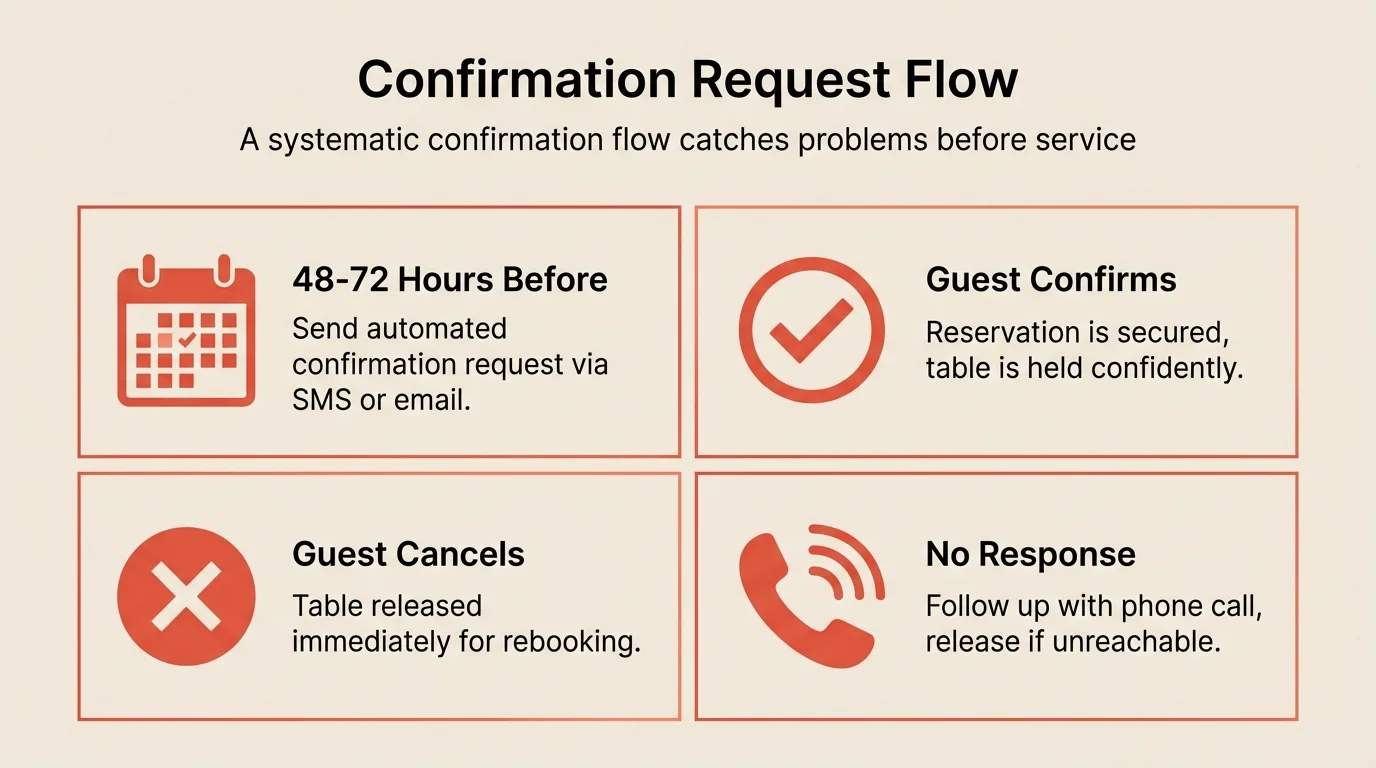
An easy cancellation is useful information. It gives you time to release inventory and contact another guest. A difficult process often creates a no-show instead.
Set up one obvious path:
- Guest opens the confirmation or reminder.
- Guest selects cancel or modify.
- The system confirms the change immediately.
- The table returns to availability or the waitlist workflow.
- Staff receive a notification when follow-up is needed.
Do not require a guest to call during the busiest part of service unless there is a genuine operational reason. If you need a conversation for large parties, provide the phone number as an alternative, not the only route.
Step 6: Build the response after a cancellation
A policy only protects revenue when the team knows what to do next.
Create a simple response order:
- Release the table immediately.
- Contact guests on the waitlist who match the time and party size.
- Offer the opening to guests who previously asked about that service.
- Make the availability visible through your normal booking channels.
- Record whether the table was filled and how long it took.
For a full operating workflow, see waitlist management. The cancellation policy and the waitlist are connected: the policy creates earlier notice, while the waitlist converts that notice into a seated party.
Step 7: Train staff and handle exceptions
Train staff on three things: the exact window, the exact charge or deposit rule, and who can approve an exception.
Use a short script:
“Your reservation can be cancelled free of charge until [time]. After that, [policy consequence] may apply. You can use the link in your confirmation, and we can help if you need to change the booking.”
Allow reasonable exceptions for emergencies, but record them. A policy becomes unfair when one staff member waives every charge and another enforces every one. Review exceptions regularly to see whether the policy needs a better rule.
Common mistakes to avoid
Making the fee hard to find Guests who discover a charge after booking feel misled. Show the policy before confirmation and repeat it in the booking message.
Requiring a phone call to cancel Guests often cannot reach the restaurant during service. Add a direct cancel or modify path so you receive notice while there is still time to respond.
Using one rule for every booking A weekday table and a holiday large party do not carry the same replacement risk. Use booking types or service periods when your system supports them.
Promising flexibility without a decision rule “We reserve the right to charge” creates uncertainty. State when a charge applies, who can waive it, and how exceptions are recorded.
Ignoring late cancellations after publishing the policy Review the data after launch. If late cancellations increase but no-shows fall, the policy may be improving communication. If both remain high, check the message timing and the cancellation path.
How to measure success
Track these metrics weekly for the first month and compare similar services:
| Metric | What to look for | How to track |
|---|---|---|
| No-show rate | Fewer silent missed bookings | Recorded no-shows / eligible reservations |
| Late-cancellation share | Fewer changes inside your window | Late cancellations / all cancellations |
| After-start cancellations | Fewer cancellations after service begins | After-start cancellations / all cancellations |
| Waitlist recovery | More released tables filled | Backfilled tables / released tables |
| Policy exceptions | Consistent and explainable decisions | Exception count and reason |
Do not judge the policy by cancellations alone. An increase in early cancellations can be positive if it gives you time to refill the table. The useful outcome is earlier information and more recovered inventory.
Check what your system can actually enforce
A policy you cannot enforce is a policy that teaches guests the rules are optional. Most booking systems handle the basics, but the details differ, several capabilities sit behind higher pricing tiers, and vendor documentation on this is often vaguer than the sales conversation. Work through this list against your own system before you publish wording that promises any of it.
| Capability | The question to ask | Why it matters |
|---|---|---|
| Policy display before confirmation | Does the exact wording appear before the guest confirms, on mobile as well as desktop? | A policy shown only in the confirmation email is hard to rely on if a charge is disputed |
| Card capture without charge | Can you hold a card without taking money at booking? | Card-on-file is much lower friction than a deposit and covers most enforcement needs |
| Automatic charge on no-show | Does it charge automatically, or does someone have to remember? | Manual enforcement becomes inconsistent enforcement within a month |
| Window-aware refunds | Does the system apply your window automatically when a guest cancels in time? | Manual refunds are where goodwill gets lost |
| One-tap cancellation | Is there a working cancel link in the confirmation and reminder? | This is the single change most likely to move notice earlier |
| Release to availability | Does a cancelled table return to your booking widget immediately? | Recovery is where the policy pays for itself |
| Audit trail | Can you show what the guest saw and when they agreed? | You will need this the first time someone disputes a charge |
| Local rules | Does your setup fit consumer law and card-scheme rules in your market? | Rules on charging for a no-show vary by country and by payment provider |
Two of these are worth insisting on: automatic charging and one-tap cancellation. Everything else you can work around with a process. Those two decide whether the policy holds up under a busy service.
A no-show cost calculator helps you model the exposure using your own covers, average check, and recovery assumptions before you decide how strict to be.
Frequently Asked Questions
What cancellation window should a restaurant use?
What should a restaurant cancellation policy say?
Should restaurants charge a cancellation fee?
Do easy cancellations increase restaurant no-shows?
How should a restaurant handle a guest who cancels repeatedly?
The bottom line
Start with a clear 24-hour rule for standard reservations, adapt it for bookings that need more planning, and put the exact wording in front of guests before they confirm. Make cancelling easy, give staff a response workflow, and measure late cancellations together with no-shows and waitlist recovery. A fair policy is one guests understand and your team can enforce consistently.
Related guides: Restaurant no-show statistics (2026) | How to reduce restaurant cancellations | Do SMS reminders reduce no-shows? | How to manage large party bookings | Waitlist management | No-show cost calculator