To reduce your no-show rate, you need to track it properly, then implement reminders, easy cancellation, and strategic deposits. Restaurants that actively manage no-shows typically cut their rate from 15-20% to under 5%, recovering thousands in monthly revenue.
An empty table on a busy Friday night isn’t just awkward. It’s money walking out the door. For a restaurant doing 100 covers at $75 average check, a 10% no-show rate means $7,500 in lost revenue every week. That’s $30,000 a month, gone.
Key takeaways
- Main solution: Track no-shows by day/party size + automated reminders + easy cancellation + deposits for high-risk bookings
- Expected result: 50-70% reduction in no-show rate
- Time to implement: 1-2 hours for initial setup
- Cost: Free with most reservation systems
Before you start
You can’t improve what you don’t measure. Start by calculating your current no-show rate.
What you’ll need:
- Reservation data from the last 30-90 days
- Access to your reservation system’s reporting
- Ability to tag or track no-shows going forward
Calculate your baseline:
If you took 200 reservations last week and 24 guests never showed, your no-show rate is 12%.
Break it down further:
- Day of week (Fridays often see higher no-shows than Tuesdays)
- Booking lead time (reservations made 2+ weeks out tend to have higher rates)
- Party size (large parties often cancel or no-show more)
- Booking source (third-party platforms may have different rates)
The patterns tell you where to focus your prevention efforts.
Step 1: Calculate your monthly cost
Understanding the financial impact motivates action and helps justify prevention investments.
What to do:
- Pull your no-show count from last month
- Multiply by your average check
- Add estimated wasted prep cost (15-20% of food cost for those covers)
- Calculate your total monthly loss
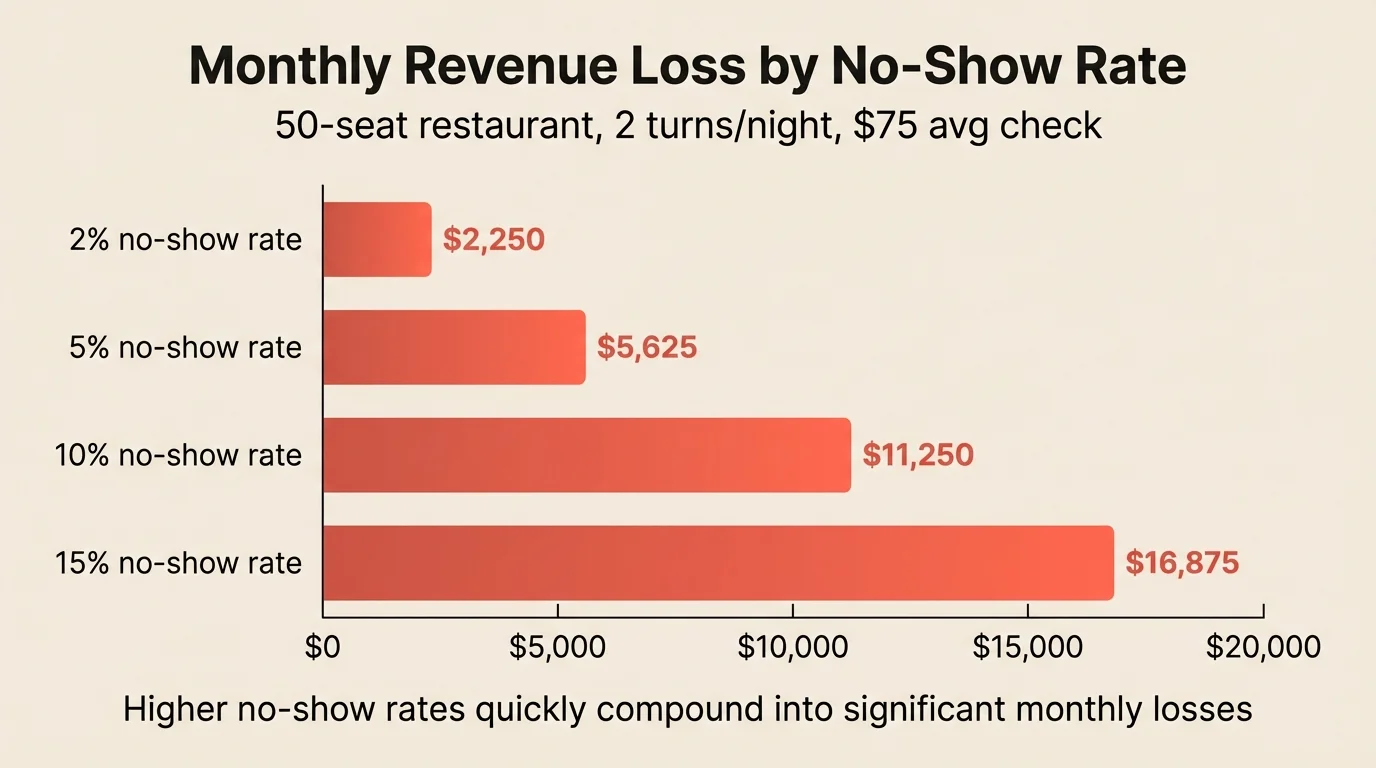
Example calculation: For a 50-seat restaurant with 2 turns per night, $75 average check, and 10% no-shows:
- Monthly covers expected: 3,000
- No-shows at 10%: 300
- Direct revenue loss: $22,500
- Add prep waste: ~$3,000
- Total monthly impact: ~$25,500
That’s a compelling case for investing time in prevention.
Step 2: Enable automated reminders
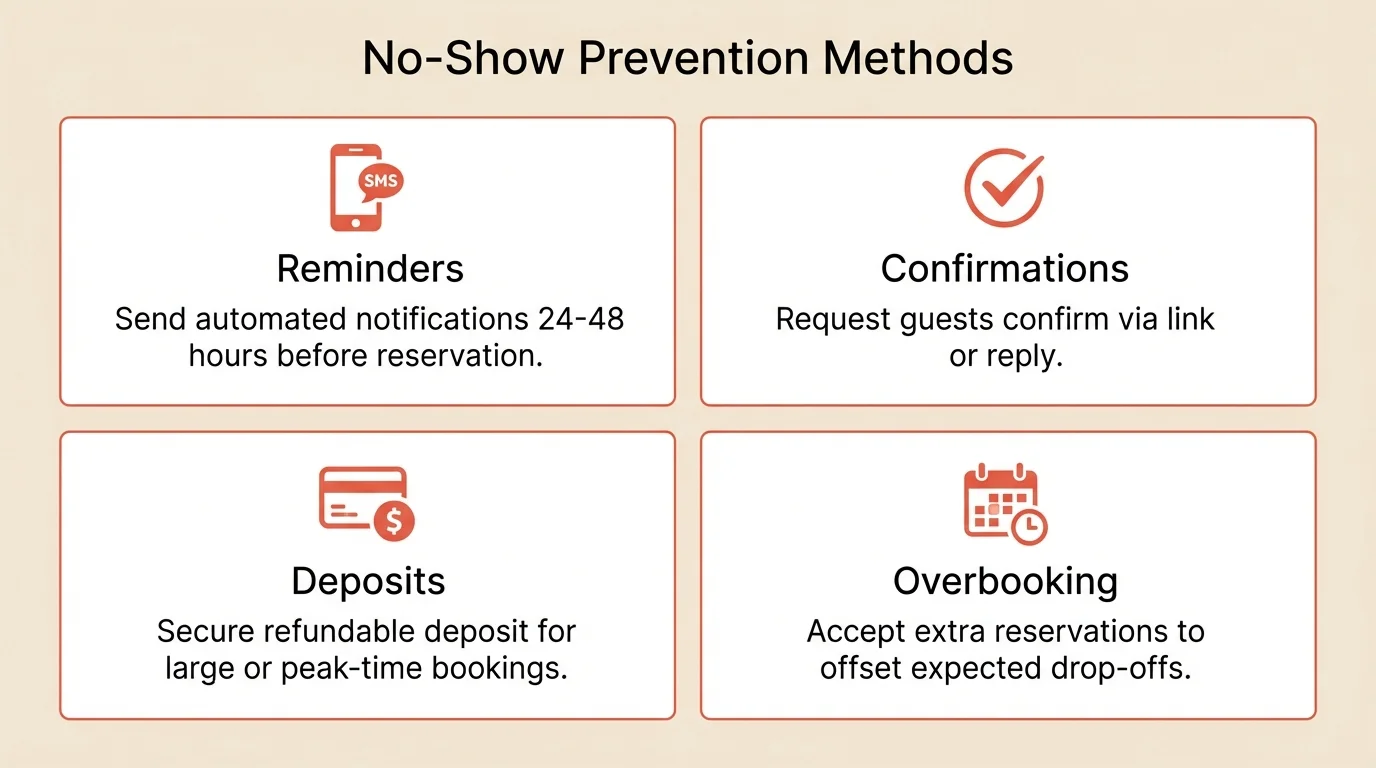
Reminders are the most effective single intervention for reducing no-shows. They catch guests who forgot and prompt those whose plans changed to cancel properly.
What to do:
- Turn on SMS reminders in your reservation system
- Set timing: 24 hours before (add 48-hour for weekends)
- Include confirm and cancel links
- Track response rates
Reminder content:
- Date, time, party size
- Restaurant name and address
- One-click confirm button
- One-click cancel button
SMS vs. email: SMS has a 98% open rate versus 20% for email. If you can only do one, choose SMS.
Step 3: Add confirmation requests
Don’t just remind guests. Ask them to confirm. This creates active commitment and identifies problem bookings early.
What to do:
- Send confirmation requests 48-72 hours before
- Use action language: “Please confirm your reservation”
- Set up follow-up for non-responders
- Release tables from guests who don’t respond
Confirmation flow:
- 48-72 hours before: Send confirmation request
- 24 hours before: Follow up with non-responders
- If still no response: Call or release table with notice
What good looks like:
- 70%+ confirmation response rate
- Non-confirming reservations flagged for follow-up
- Problem bookings identified 24+ hours before
Step 4: Make cancellation frictionless
This seems counterintuitive, but making it easy to cancel reduces no-shows. Guests who can’t easily cancel often just don’t show up.
What to do:
- Include one-click cancel in every reminder
- Don’t require phone calls during service hours
- Send a brief confirmation when cancelled
- Trigger your rebooking process immediately
Why it works: A guest whose plans changed faces two options:
- Call the restaurant during their busy service (hard)
- Just not show up (easy)
If you add a third option, clicking a link to cancel instantly, many guests will take it. You get notice; they avoid awkwardness. Everyone wins.
Step 5: Implement strategic deposits
Deposits change behavior dramatically. Even small amounts create commitment that reduces no-shows to near-zero for those bookings.
What to do:
- Identify high-risk bookings (large parties, peak times, special occasions)
- Set deposit amounts ($20-50 per person typical)
- Make deposits refundable within your cancellation window
- Apply deposits to the final bill
When to require deposits:
- Large parties (6+ guests)
- Friday and Saturday prime time
- Holidays (Valentine’s Day, Mother’s Day, New Year’s Eve)
- Guests with previous no-show history
For a detailed guide on implementing deposits, see prepayments and deposits.
Step 6: Consider strategic overbooking
If your no-show rate is consistently high, overbooking can recover lost revenue. But do it carefully.
What to do:
- Calculate your historical no-show rate by day
- Start conservative: if no-shows run 12%, overbook by 5%
- Track results for 4 weeks before adjusting
- Have a backup plan when everyone shows
How it works: If your no-show rate is consistently 10% and you have 100-cover capacity:
- Without overbooking: 90 guests typically show
- With 5% overbooking (105 bookings): ~95 guests show
You fill 5 more tables without the disaster of everyone showing up.
Backup plan:
- Waitlist ready to absorb overflow gracefully
- Bar seating available
- Scripts for guests: “Your table will be just a few more minutes”
For more on overbooking strategy, see capacity planning.
Step 7: Track patterns and repeat offenders
Not all no-shows are equal. Some guests are chronic offenders who cost you money repeatedly.
What to do:
- Tag all no-shows in your system
- Track by guest to identify repeat patterns
- Flag chronic no-shows for special handling
- Review patterns weekly
Handling repeat offenders:
- First offense: Note in system, no action
- Second offense: Require deposit for future bookings
- Third offense: Polite conversation about the impact
- Chronic pattern: Consider declining future reservations
Common mistakes to avoid
Not tracking the right data
Overall no-show rate isn’t enough. Break it down by day, time, party size, and source. The patterns reveal where to focus.
Making cancellation too hard
Trapping guests doesn’t work. They’ll ghost you instead. Make cancelling as easy as booking.
Applying deposits to everything
Deposits for Tuesday lunch at a half-empty restaurant creates friction without benefit. Target high-risk scenarios only.
Overbooking without a plan
Overbooking works when you have systems to handle overflow gracefully. Without a waitlist and backup seating, you’ll create disasters.
Ignoring the underlying patterns
If Tuesday 6pm has 25% no-shows, something specific is wrong. Maybe it’s a booking source issue, maybe it’s a segment that books but doesn’t commit. Investigate.
How to measure success
Track these metrics weekly:
| Metric | Before (example) | Target | How to track |
|---|---|---|---|
| Overall no-show rate | 10-15% | Under 5% | No-shows / reservations |
| Deposit booking no-shows | 8-12% | Under 2% | No-shows on deposit bookings |
| Confirmation response rate | 50% | 70%+ | Responses / requests |
| Same-day cancellation rate | 3-5% | Monitor trend | Same-day cancels / reservations |
Calculate recovered revenue:
Tools that help
Modern reservation systems handle most no-show prevention automatically.
SMS and email reminders send messages at the right times with one-click confirm and cancel buttons.
Deposit collection with built-in payment processing makes collecting and applying deposits seamless.
Guest history tracking flags repeat no-shows and lets you require deposits or have conversations before problems recur.
Analytics show no-show rates by day, time, party size, and source so you can identify patterns.
If your current system lacks these features, Resos includes all of them with no per-cover fees.
Frequently Asked Questions
What is a good no-show rate for restaurants?
How much do no-shows actually cost my restaurant?
Should I charge a no-show fee?
Do SMS reminders actually reduce no-shows?
How do I track no-show repeat offenders?
The bottom line
No-show rate is one of the most controllable metrics in your operation, yet many restaurants treat it as unavoidable. Start by calculating your current rate and the monthly cost. Then implement automated reminders. That single change often reduces no-shows by 30% or more.
Add confirmation requests, easy cancellation, and strategic deposits for high-risk bookings. Track patterns to identify problem areas and repeat offenders.
The restaurants that treat no-show rate as a manageable metric, not an act of nature, consistently outperform those that don’t.
Related guides: How to reduce no-shows | Prepayments and deposits | Capacity planning